
A Parent’s Checklist Before Connecting WhatsApp
Agree on which account you will review
Connect only an account you own or are authorized to access. Explain which account will be connected, who can open the dashboard, what types of records may appear and why you want to review them.
A shared understanding is more useful than a vague promise of “family safety.” For example, you may agree to review an unfamiliar group invitation or a concerning conversation together. Decide when to revisit that arrangement.
Decide what you actually need to see
For some situations, reviewing one conversation together on the phone is enough. A separate archive dashboard is useful when you need to return to available records across chats and media from a browser.
Ask whether you need message context, a shared attachment, a contact’s available details or a supported call record. These are different from wanting screen-time controls or alerts. FamiPatrol provides record review, not device control or automatic threat detection.
Understand authorization and reconnection
FamiPatrol uses QR authorization through WhatsApp Linked Devices. The account owner’s phone is needed for setup. No extra monitoring app is installed on either phone, but the connection is not promised to be invisible or permanent.
If the session ends or expires, new records stop arriving until the connection is restored. Do not interpret an unchanged dashboard as proof that the account has had no new activity.
What WhatsApp Parental Monitoring Can Show
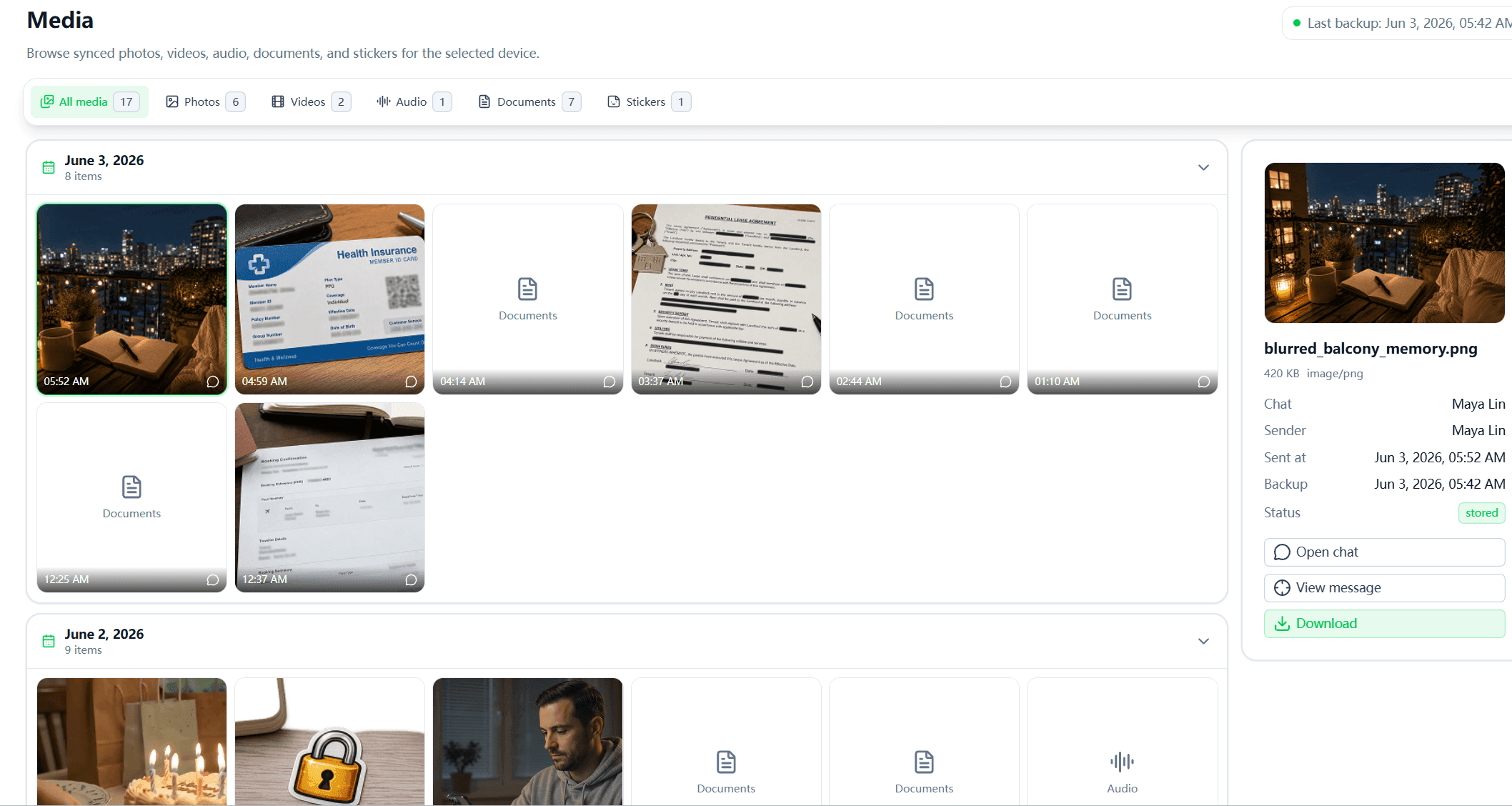
FamiPatrol organizes records that have successfully synchronized from the authorized connection:
| Review task | Available view | What it does not establish |
|---|---|---|
| Read a conversation | Synced individual messages | Every message ever sent |
| Understand a group discussion | Synced group chat history | The full context outside that archive |
| Review shared content | Available photos, videos, voice notes and documents | That every attachment remains available |
| Identify a saved or encountered contact | Synced contact names and profile details | Who the account owner is talking to right now |
| Review a call record | Supported time, direction and duration fields | What was said during the call |
A WhatsApp contact tracker label should not be read as a live relationship map. A contact record is not proof of recent communication. Likewise, a call-history entry provides metadata, not a recording or an explanation of the conversation.
What to Check in a WhatsApp Monitoring Tool
Clear setup requirements
Check whether the product requires an installed monitoring app, a linked-device connection or some other access method. FamiPatrol uses QR connection and a web dashboard; it cannot connect an account from a phone number alone.
Specific data coverage
Look for named record types and their limits. “All activity” can imply far more than a product supplies. FamiPatrol supports synced chats, media, contacts and available call metadata. It does not provide online-status tracking, last-seen tracking, screen-time reports or GPS tracking.
Honest update expectations
Ask how the product distinguishes connection status from sync progress. Available history, session health, storage and attachment downloads affect what you can review. A “connected” label does not promise that every record is already synchronized.
A demo you can inspect
Use the WhatsApp dashboard demo to see how records are organized. The demo uses fictional content; it does not demonstrate that your own account will have the same volume or completeness of data.
Pricing that matches your account needs
Compare the WhatsApp monitoring plans and the included storage. Each current plan covers one connected WhatsApp account slot and 1GB of base account storage. Do not assume a longer billing period changes which record types are supported.
How to Review Messages with Your Child
Start with the concern that prompted the review. Open the relevant synced conversation and read the surrounding messages together. Ask what happened before or outside the visible chat rather than drawing conclusions from a short excerpt.
If an attachment matters, check whether its file is available. If a call entry matters, remember that FamiPatrol cannot play the call. If records are missing, check connection and sync status before assuming that someone removed them.
Use the archive as a starting point for discussion. FamiPatrol does not classify a message as bullying, identify a scammer or send keyword alerts. Those judgments need more context than a dashboard can provide.
For a setup walkthrough, use how to monitor WhatsApp messages. For a specific safety concern, read WhatsApp romance scam warning signs.
Frequently Asked Questions for Parents
Does a WhatsApp tracker for parents need an extra app?
FamiPatrol needs no extra monitoring app. You still need the account owner’s WhatsApp phone to approve the QR connection, and you may need it again if reconnection is required.
Does FamiPatrol provide parental controls?
It provides authorized, read-only record review. It does not block WhatsApp, limit screen time, send messages or manage the phone.
Can I listen to WhatsApp calls?
No. Supported call history contains available metadata only. Synced voice messages are a separate content type and may be playable when their audio files are available.
Does it alert me to dangerous messages?
No. FamiPatrol does not provide keyword alerts or automatic content-risk detection. You review available records yourself.
Can I recover deleted messages or export the entire archive?
FamiPatrol does not offer deleted-message recovery or bulk archive export. Its dashboard is for reviewing available synchronized records.